Getting Started
What NixoraTrade is, the four layers it is made of, a map of every capability, and how a signal actually travels from your alert to your broker.
NixoraTrade is a trading workspace with an execution layer: you study a market, write down what you decided and why, and — when you want it — let the same decision reach your broker automatically.
Two things make it different from most tools in this category, and both have consequences worth understanding before you rely on it.
Your work is yours — on your device, or in the cloud when you want it. Chart annotations, your knowledge base, journals and notes live in your browser by default: private by construction, because they are never sent anywhere. On a subscription you can turn on cloud backup, and the same work becomes recoverable on a new device, encrypted at rest, with earlier versions kept.
Choose whichever suits you, and know the trade in each direction. Device-only is the most private option and the one where clearing your browser data loses everything, since we hold no copy to restore. Cloud backup removes that risk. Either way you can export a copy by hand at any time, and closing your account deletes anything we hold.
Execution runs through your own broker terminal. For MetaTrader, orders are placed by an Expert Advisor running in your MT4 or MT5, connected to your account — an EA only, with no DLL to install. Nothing is added to your terminal beyond a standard Expert Advisor, so you are not asking your broker or prop firm to allow imports they normally refuse. We never hold your broker password. The platform's job is to carry a decision to that terminal quickly and to keep an auditable record of what it carried.
Who this is for
Three groups get value out of this, and they want different things from it:
- Systematic traders. Something already decides for you — a TradingView strategy, a script, an indicator that fires alerts. What you want is for that decision to reach a broker at 3am without you awake to press the button.
- Discretionary traders. You make the call yourself, but you want the position sizing, the stop and the record-keeping to happen the same way every time rather than from memory.
- Multi-account and prop-firm traders. One decision has to arrive at several accounts at once, identically — including evaluation accounts with rules that are expensive to break.
What none of them get is a signal. Nothing here decides what to trade: the reasoning stays yours, and the platform's job is to carry it accurately and write down what happened.
Setting it up: four steps
- Connect a broker or terminal. MetaTrader 4 or 5 through the Expert Advisor, Alpaca for paper trading, or Interactive Brokers through the local connector. Live, demo and prop accounts all connect the same way.
- Create a strategy. A strategy is the thing your alerts talk to, and it gets its own webhook URL. Keeping one URL per strategy is what makes it possible to turn one thing off without touching anything else.
- Subscribe accounts to it. A subscription binds one account to that strategy and carries the sizing and rules for that account. One strategy can drive several — that is how the same decision reaches three accounts without being sent three times.
- Point your alert at the webhook. Anything that can send a web request works; you do not need TradingView specifically.
Do step 1 and place a single manual trade before automating anything. The first end-to-end order is what tells you the plumbing is real.
The workspace at a glance
Everything below lives on one screen. This is the home view with a few accounts connected:
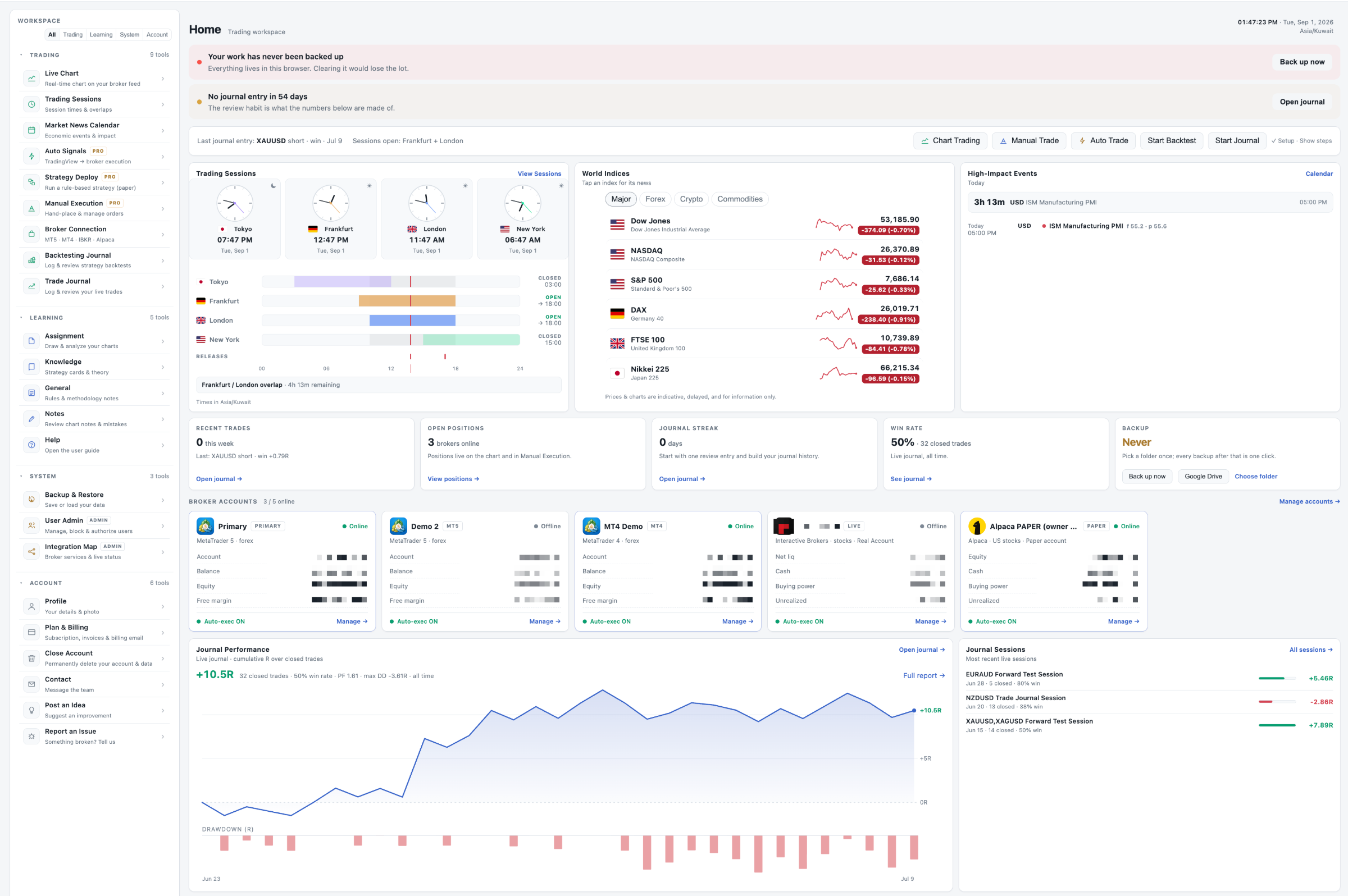
Four things are worth finding once, because you will use them constantly:
- The left sidebar groups every tool by what it is for — Trading, Learning, System, Account — and the filter chips at the top narrow it when the list gets long.
- The banners at the top are the only things that interrupt you, and they appear only when something is genuinely unattended: no backup yet, no journal entry in weeks.
- The broker account cards show each connected account with its balance and whether auto-execution
is on. The count beside the heading (
3 / 5 online) is the quickest health check you have. - Journal Performance at the foot plots cumulative R over your closed trades, with drawdown beneath it — the two numbers that tell you whether the rest of it is working.
The clocks and session bars are in your timezone, and the overlap strip underneath ("Frankfurt / London overlap · 4h 13m remaining") is the part most people end up watching.
What the system is made of
Four layers, and it helps to keep them apart when something goes wrong:
| Layer | Where it runs | What it holds |
|---|---|---|
| Workspace | Your browser (and your cloud backup, if you enable it) | Annotations, knowledge base, journals, notes |
| Account service | Our server (Cloudflare Worker + D1) | Your account, settings, connections, alerts and order records |
| Execution bridge | Your MT4/MT5 terminal, or a broker API | The actual orders |
| Delivery | Telegram, Discord, email | Notifications about what happened |
The practical consequence is knowing which layer to suspect. A workspace that looks empty on a new device is the first layer behaving as configured — either you are device-only, or cloud backup is not switched on for that account — rather than anything lost on our side. An order that never appears at your broker points at the third layer, and the platform keeps a record of exactly what it sent.
Capabilities map
Study and record
- Assignment — annotate charts, mark structure, and keep the reasoning attached to the chart.
- Knowledge — your own playbook: setups, rules, checklists, and linked notes.
- Trade Journal and Backtesting Journal — log live and tested trades, with performance reporting over the results.
- Notes and General — free-form capture that links back to charts and journal entries.
- Trading Sessions — session windows (with daylight-saving handled) so timing rules are explicit.
- Market News Calendar — scheduled economic events alongside your planning.
Analyse
- Live Chart — a live chart fed by your own connected terminal.
- Indicators — 73 indicators from a single shared registry, so a study behaves identically on a chart and inside a backtest. That shared registry is the point: two implementations would drift.
- Backtesting — run a strategy over history and journal the result.
Execute
- Manual Execution — a trading ticket with position sizing and a kill switch.
- Auto Signals — alerts from TradingView (or anything that can post a webhook) become orders.
- Connections — MetaTrader 4 and 5 through the Expert Advisor; Alpaca (paper trading); Interactive Brokers through a local connector.
Keep informed
- Notifications — per-event routing to Telegram, Discord or email, with quiet hours, and safety alerts that deliberately ignore them.
- Backup & Restore — export and re-import your workspace by hand.
- Cloud Backup — available on a subscription: your workspace recoverable on any device, encrypted at rest, earlier versions kept, and deleted in full when you close your account. Off until you switch it on.
How a signal actually travels
Worth reading once, because it explains what to check when something is slow or missing:
- Your alert fires (TradingView, or your own script) and posts to your personal webhook URL.
- Our server validates it, decides whether to accept, refuse, deduplicate or expire it, and records that decision before answering.
- The order is pushed to your connected terminal, and the Expert Advisor places it with your broker.
- The broker's response — filled, rejected, the ticket number — travels back and is journalled.
- You get a notification on whichever channel you routed that event to.
Every step is recorded, including refusals. If the system declined to place something, that is a fact you can look up rather than a silence you have to interpret.
What it is not
Being straight about this saves disappointment later:
- It is not a broker. Your money and your positions stay with your broker; we route instructions.
- It is not advice. No signal, indicator, or backtest here is a recommendation to trade.
- It is not magic latency. The largest delay in the chain is usually the alert provider, before the request ever reaches us.
- Automated trading carries real risk, including losses beyond what a backtest suggested. The Risk Disclosure is the document to read before you connect a live account.
And four practical limits, which are easier to read now than to discover later:
- It is not built for sub-minute scalping. The chain is fast — but it is a chain, and a strategy whose edge lives inside a few hundred milliseconds is the wrong fit for any webhook-based system, ours included.
- You own the logic of your signals. A repeated signal is deduplicated, so a double-fired alert will not open two positions. Two contradictory signals are a different thing: nothing can decide which one you meant, so overlapping rules are yours to prevent.
- It is not set-and-forget. Terminals disconnect, brokers go down for maintenance, and subscriptions expire. The dashboard's account count and the connection badges exist precisely so that a five-second glance is enough — but somebody has to glance.
- Most of the delay is not ours. The alert provider is usually the largest single wait in the chain, before the request ever arrives. Measuring the round trip end to end will tell you more than tuning anything at our end.
One thing that is different here, and worth knowing because it changes how you write rules: the broker's answer comes back. Fills, rejections and ticket numbers are journalled against the order that caused them, so your record reflects what the broker actually did rather than what was requested. Systems that only fire and forget leave you to reconcile that by hand.
Where to go next
Connect a terminal and place a paper trade before anything else — the first end-to-end order is what turns all of the above from description into something you can trust.