NixoraTrade
NixoraTrade · a Nixora Systems product

Your strategy
never sleeps.
Neither does the market.

Point your robot, your TradingView alert or your own rules at a private webhook. Every signal gets validated, risk-sized and placed with your broker — at 3am, mid-meeting, or somewhere over the Atlantic.

Your rules · your webhook · your broker
Automated execution runs on your connected broker accounts. Nothing is placed while auto-execution is off.
Auto-execution ON Online
YOUR STRATEGY + TradingView · NinjaTrader or any tool that fires an alert BUY 3:04 AM NIXORATRADE your private webhook validatedrisk-sized not a duplicatejournalled MetaTrader 5 order placed MetaTrader 4 order placed Any connected broker as they come online 250–800 ms signal received → order sent
1Your strategy firesTradingView, or any tool that sends an alert
2We check it firstValidated · risk-sized · not a duplicate · journalled
3Your broker places itOn your connected broker account

250–800 ms signal received → order sent

1 Your robot fires 2 We check it first 3 Your broker fills it

One switch stops everything. Turn auto-execution off and not a single order leaves — however many signals arrive.

When you place it yourself

Two ways by hand. The same checks as the robot.

From the chartYou draw the trade
SELL 4326.74 BUY 4327.23 XAU/USD H1 1m 15m 1H 4H 1D Live SMA 20 · RSI 14 4472.17 4259.69 4167.52 4123.40 BUY · +$2,124 Long Short Entry 4259.69 TP 4472.17 SL 4167.52 4123.40 Balance 200,000 Risk % 0.5 Lots 0.10 0.07 Risk $921.69 R : R 1 : 2.31 1 : 1.62 Place Buy Drag the stop. The ticket re-reckons. MT5 · MT4 Lots and reward:risk follow the level you moved. The money at risk does not.
Entry4259.69
Take profit4472.17
Stop loss4167.52 → 4123.40
Lots0.10 → 0.07
Reward : risk1 : 2.31 → 1 : 1.62
Money at riskunchanged at $921.69
Available onMT5 · MT4
By handIt refuses to guess
Manual Execution MT5 · MT4 EURUSD BUY BID 1.08298 ASK 1.08300 SPREAD 0.2 PORTFOLIO 15,000.00 RISK PER TRADE 1.0% · 150.00 STOP LOSS 1.08000 STOP DISTANCE 30.0 pips VOLUME 0.50 lots RISK AT SIZE 150.00 Can’t place — set a stop loss to size it Place Buy · 0.50 lots It refuses to guess. No stop, no size — and the button says which.
Portfolio15,000.00
Risk per trade1.0% · 150.00
With no stopno size — refused
Stop set30.0 pips
Volume0.50 lots
Risk at size150.00
Available onMT5 · MT4
Posted to your channelEveryone sees it the moment you place it
2:22 139 NixoraTrade Signals 4 subscribers SHORT · EURAUD Entry 1.63570 SL 1.63659 TP 1.63384 R : R 1 : 2.10 Risk 0.5% · 200,000 Size 16.08 lots YOUR STRATEGY NOTE Level held on the retest. Entered at the open of the next bar, stop above the high. Educational purposes only — not financial advice. Trading involves substantial risk of loss. Visit www.NixoraTrade.com NixoraTrade Signals · 5:09 AM
TelegramDiscord

The trade posts itself, to a channel you own.

The chart as you drew it, the entry, stop and target as you placed them, the risk and the size, your own note and your own disclaimer — assembled and sent the moment you commit.

Your channel, not oursYou supply the bot and the channel, so the audience, the history and the moderation stay yours.
Telegram or DiscordPoint it at a Discord Forum channel and every trade gets its own thread.
Test before you trust itA Test button on the form and on every saved channel, so a wrong token fails in front of you rather than silently at 3am.
More than one at onceRun several channels together and switch any of them off with a checkbox.
Automated execution · MetaTrader 5 & MetaTrader 4

Your signal trades itself.
Through the same door.

Send an alert from TradingView — or from anything that can fire a webhook — and the order is placed for you while you are away from the screen. An automated order is still an order: it takes the same validation, the same risk admission and the same reconciliation as one you place by hand, rather than becoming a parallel path with its own rules.

TradingView alertsA webhook fires your alert straight into MetaTrader 5 or MetaTrader 4 execution.
Pushed, not polledYour terminal holds a connection open, so a signal is handed to it as it arrives instead of waiting for the next scheduled check.
Sent onceA duplicate alert does not become a duplicate order — commands carry an identity the server refuses twice.
Same controlsArm/disarm, the notional ceiling and the audit history all still apply.

Automated execution is available on MetaTrader 5 and MetaTrader 4. Availability and execution mode depend on the connection and account permissions. End-to-end timing depends on your alert source, your network and your broker's own fill — we do not publish a figure we have not measured on your setup. Nothing here implies a strategy will be profitable.

What happens when your alert fires LIVE
1 · AlertTradingView, or any tool that fires a webhook
2 · ReceivedYour private webhook, authenticated
3 · CheckedSymbol, size, price, broker rules
4 · RiskNotional ceiling · arm state · not a duplicate
5 · DeliveredPushed to your open terminal connection
6 · PlacedYour connected broker account
7 · ReconciledFill, rejection and state come back

Steps 2 to 5 are ours and they are built to add as little time as possible — one authenticated hop, then a push down a connection your terminal already holds open. Steps 1, 6 and 7 belong to your alert source and your broker, and they are usually the larger share.

The workspace

One workspace, five parts of the same trading process.

Most tools cover one of these well and push you elsewhere for the rest. Everything below shares one order path, one risk check and one record.

01

Analyze

Live charting with 73 indicators, drawings and closed-trade replay.

Charting on MT5 · MT4
02

Build

Order ticket with position sizing, risk budget and broker-aware controls.

All connections
03

Execute

Validation and risk admission before anything reaches your broker.

All connections
04

Monitor

Positions, protection, working orders and account state in one book.

All connections
05

Review

Trade journal, session notes and a backtesting journal for what comes next.

All connections
Order construction

You choose the risk.
The ticket finds the size.

Most tickets ask how much you want to buy. That is the wrong question — it makes you do arithmetic under time pressure, in the one place a slip is expensive. Set what you are willing to lose and where the trade is wrong, and the size follows.

Risk budgetA percentage of the account or a fixed amount. The volume is derived, not typed.
Stop distanceDrives the size. Move the stop and the volume moves with it.
Risk : rewardShown before you commit, not worked out afterwards.
Spread awareA market buy fills at the ask. The sizing can account for that instead of pretending it does not exist.
Broker awareOrder types and prices are validated against what the connection actually accepts, and rounded to its tick.

Availability depends on broker, asset class and order type.

Position sizing EURUSD · MT5
Account15,000.00
Risk per trade1.0% · 150.00
Entry1.08300
Stop loss1.08000
Stop distance30.0 pips

Volume0.50 lots
Loss if stopped−150.00
Gain at target+400.00

Move the stop to 1.07850 and the volume falls to 0.33 — the risk stays at 150.00. That is the point: the number you set is the one that holds.

Connections

Your broker. Your account.
NixoraTrade is the workspace.

You connect a supported trading account. NixoraTrade never holds your funds or securities — it is the interface and the control layer between your decision and your broker.

MetaTrader 5
Connected

Manual execution, chart trading, live chart feed from your terminal, automated execution from your webhook, and journalling from held and closed positions.

MetaTrader 4
Connected

Manual and automated execution and chart trading through the same controlled order path, with MT4's own order and stop-loss / take-profit semantics.

Roadmap

The brokers we are building toward.

In the order we are building them. Listed because they are planned — not because they are ready. None of these can be traded from NixoraTrade today.

Under evaluation

The brokers we intend to reach, in no committed order and with no date. Each one needs its own API licence review before it can be promised, and none of them can be traded from NixoraTrade today.

Tradovate
ProjectX
NinjaTrader
Robinhood
E*TRADE
Webull
tastytrade
Tradier
Coinbase
Kraken
Binance
Bybit
Crypto.com
ActivTrades
ACY Securities
Admirals
Ally Invest
AMP Global
AutoShares
AvaTrade
Binance.us
BingX
Bitfinex
Bitget
BitMart
BitMEX
Bitstamp
Bitvavo
BlackBull
Blockchain.com
Blueberry
Capital.com
Cash App
CFI Financial
Chase
Cobra Trading
Coinbase Pro
Deribit
Deriv
dYdX
EdgeClear
Eightcap
eToro
Fidelity
Firstrade
FOREX.com
FP Markets
Fusion Markets
FXCM
FXOpen
FxPro
Gar Wood
Gate
Gemini
GO Markets
HTX
Huobi
Hyperliquid
IC Markets
IG
Ironbeam
KuCoin
Lightspeed
Lime
LiteFinance
M1 Finance
Magnifi
Merrill Edge
MEXC
Moomoo
OANDA
OKX
Optimus Futures
Pepperstone
Phemex
Public
Qtrade
RoboForex
Samco
Charles Schwab
Skilling
SoFi Invest
StoneX
TastyFX
TD Direct Investing
Tickmill
TradePro
Trade The Pool
TradeZero
Trading212
Vanguard
Wealthsimple
Wells Fargo
Wolverine
WooX
Zacks Trade
Zerodha

Broker names and marks are the property of their respective owners. Their appearance here indicates intended or planned support and does not imply any partnership, approval or endorsement by them.

Execution control

Control before execution.

Every order takes the same path, whether you placed it by hand, from a chart, or through an automated workflow. There is no second route that skips the checks.

Order
Manual, chart or automation. One entry point.
Validation
Prices, quantities and broker-specific rules, refused before contact.
Risk admission
Notional ceiling on anything that creates exposure.
Broker
Sent once. Duplicate protection by command identity.
Reconciliation
The broker stays authoritative; state is reconciled continuously.
Arm / disarm per connection A market order requires a live executable price, or it is refused Cancels and closes still work while disarmed Full audit history
Positions & orders MT5
EURUSDLONG 0.50 @ 1.08215 +100.00
Stop 1.08000 −107.50 · Target 1.09100 +442.50
XAUUSDSHORT 0.10 @ 2421.15 +25.50
Stop 2428.00 −68.50 · no target set
GBPUSDLONG 0.20 @ 1.27180 +26.80
Unprotected — no stop on this position
Monitoring

Know what is covered.

A position row that says nothing about protection is the most expensive kind of comfort. Each position states its stop and target, what each is worth against your entry, and — the row that matters — says plainly when there is no stop at all.

PositionsVolume, entry, current price and live P/L.
ProtectionStop and target with the money at each level, and an explicit warning when one is missing.
OrdersWorking orders shown separately from the positions they belong to.
AccountBalance, equity, margin and floating P/L.
Analyze and review

The loop closes.

Execution is the middle of the process, not the end of it. Charting, backtesting and journalling share one indicator library and one record, so what you test is what you trade and what you review.

Charting and chart trading

Live charts fed by your own MetaTrader terminal. Draw, annotate, replay closed trades, and place trades directly from the chart — the entry, stop and target above are the order, not a drawing of one.

73 indicatorsDrawings Position & order boxesClosed-trade replay Watchlists

Chart trading is available on MetaTrader 5 and MetaTrader 4.

Backtesting and journalling

A backtesting journal for strategy work and a trade journal for what actually happened — entries, exits, sessions, notes and chart annotations, with orders logged against the session that produced them. The indicator library is shared, so a study you test with is the same study you trade with.

Trade journal Session · London open
EURUSDBUY 0.50 @ 1.08300 +400.00 Target
Took the plan · risk 150.00 · planned R:R 1 : 2.7
XAUUSDSELL 0.10 @ 2421.15 −68.50 Stopped
Exited at the stop · no averaging down
GBPUSDBUY 2.00 @ 1.27180 Rejected
Refused before the broker — over the notional ceiling

Rejections are journalled too. A record that only keeps the fills cannot tell you what your rules stopped you doing.

Inside the product

Seventeen screens, one workflow.

Not a feature list — the actual screens, and what each one is for. In three runs: placing the trade, reading the market, and reviewing what happened.

01 · Trade

Place it, or let it place itself.

The screens where an order is built, checked and sent — by hand, from the chart, or from a signal that arrives while you are nowhere near the screen.

Live Chart · MT5 & MT4

The ticket lives on the chart.

Your MetaTrader terminal feeds the chart. You draw the trade where you see it — drag the entry, the stop and the target on the price axis — and the ticket beside it recalculates as you move them. The order that gets placed is the one on the screen.
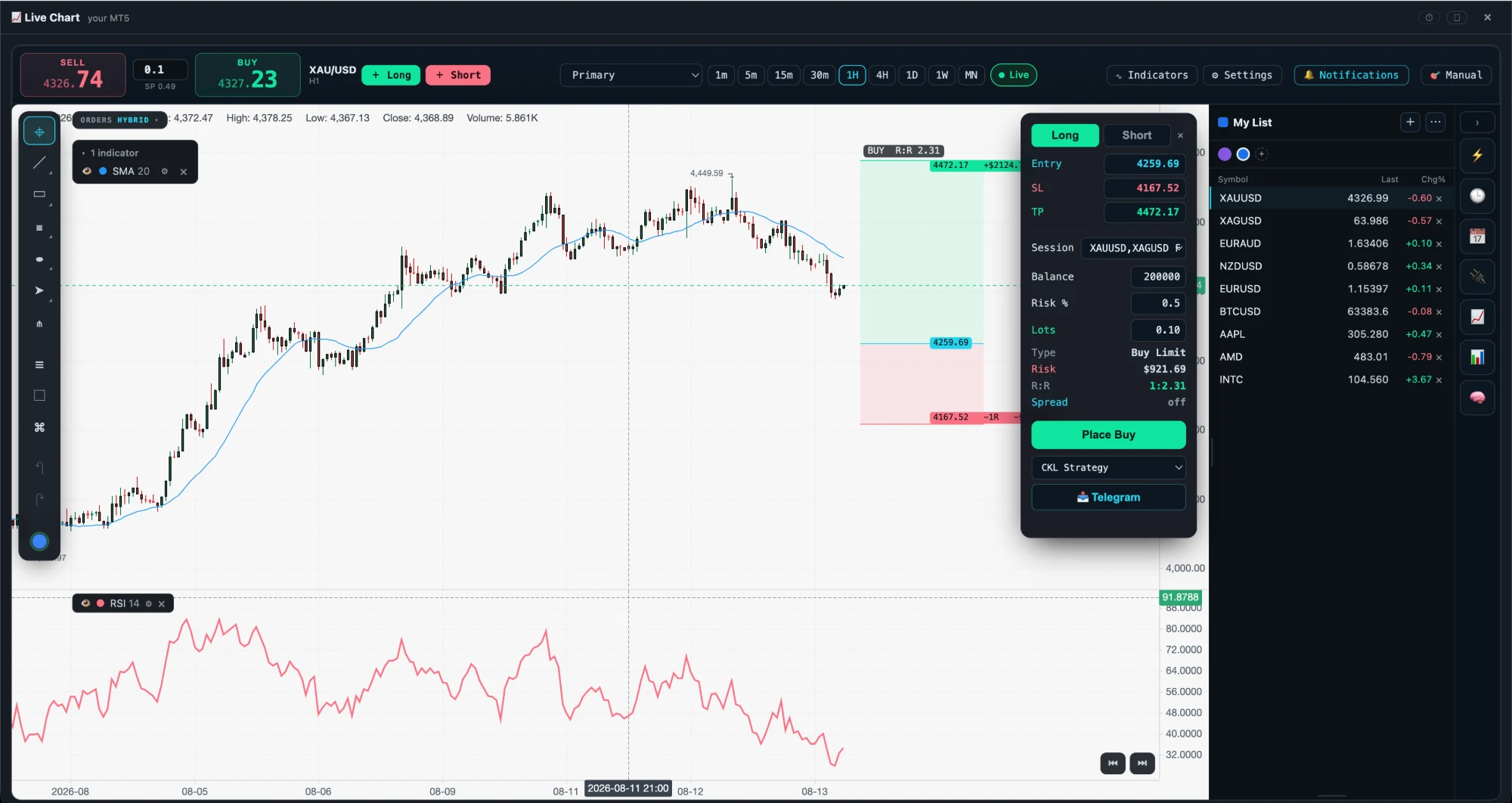
The ticket lives on the chart.
Trade from the chartLong or short, with the entry, stop and target as draggable levels rather than typed numbers.
Risk on the paneBalance, risk %, lots, money at risk and R:R are all shown before you commit — this one reads 1:2.31 and $921.69.
Reward and risk shadedThe green block is what the target is worth, the red block is what the stop costs.
Indicators and drawings73 indicators. Here SMA 20 on price and RSI 14 in its own pane.
Watchlist alongsideLive last price and change on every symbol you follow, colour-tagged and synced to your account.
Journal bindingAttach the trade to a journal session and a strategy as you place it, so the record writes itself.
Share itPost the chart with its entry, stop, target and strategy straight to Telegram.
Spread awareToggle whether a market buy is sized against the ask instead of the mid.
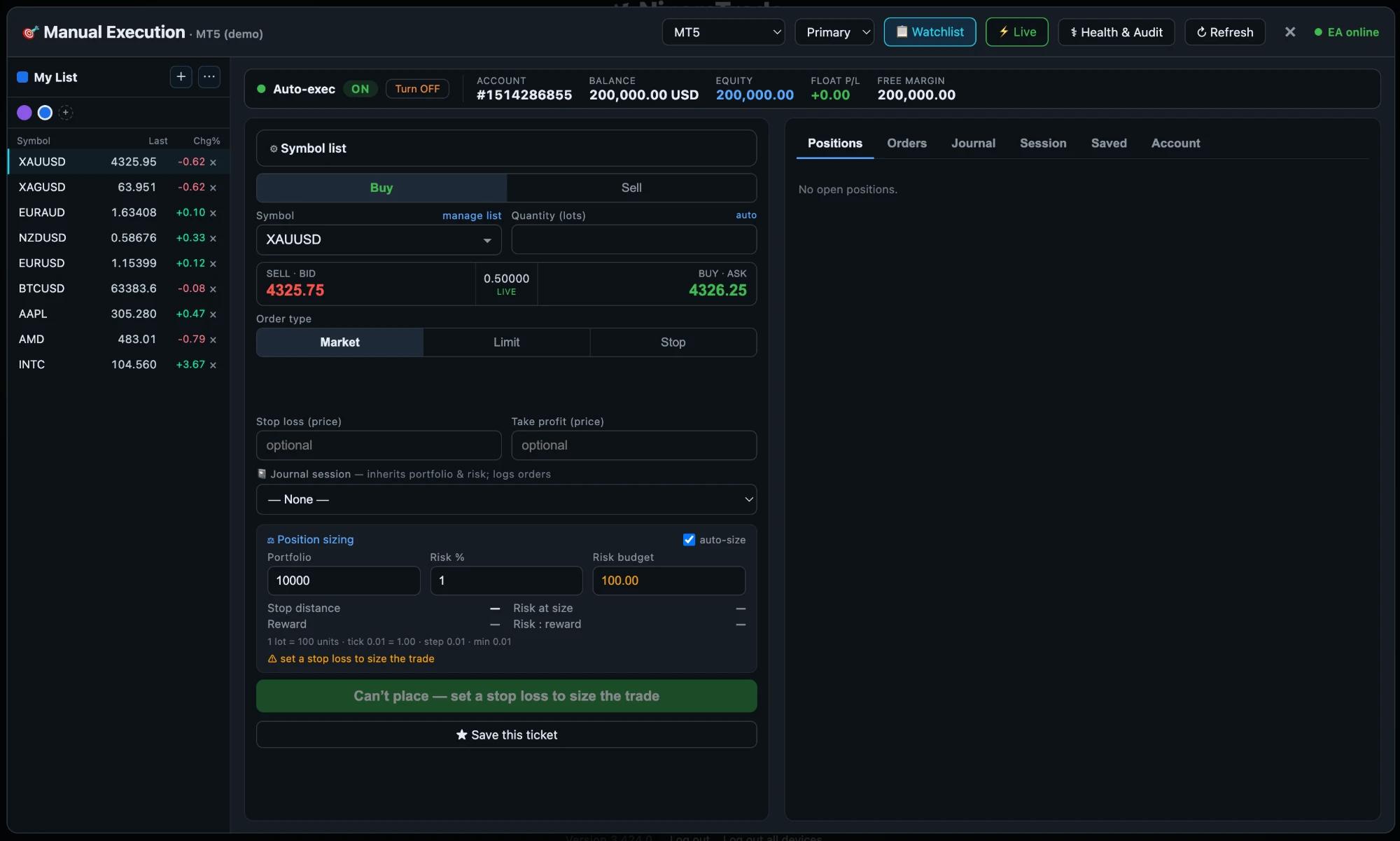
Manual Execution

A ticket that refuses to let you guess.

Set the portfolio, the risk percentage and the stop, and the size is derived. Leave the stop out and the button does not become a dare — it tells you what is missing and stays disabled.

A ticket that refuses to let you guess.
Auto-exec master switchOne control arms or disarms execution for the account, shown next to live balance, equity, float P/L and free margin.
Live bid, ask and spreadThe prices you are actually dealing on, not a delayed mid.
Market, limit and stopWith stop loss and take profit as prices on the same ticket.
Position sizingPortfolio, risk %, risk budget, stop distance, risk at size and risk : reward, computed as you type.
Contract specificsLot size, tick value, step and minimum for the instrument — so the size it gives you is one the broker will accept.
It fails closed“Can’t place — set a stop loss to size the trade.” The reason is on the button.
Saved ticketsKeep a setup you place often and reload it.
Positions, Orders, Journal, Session, AccountThe whole book beside the ticket, on tabs.
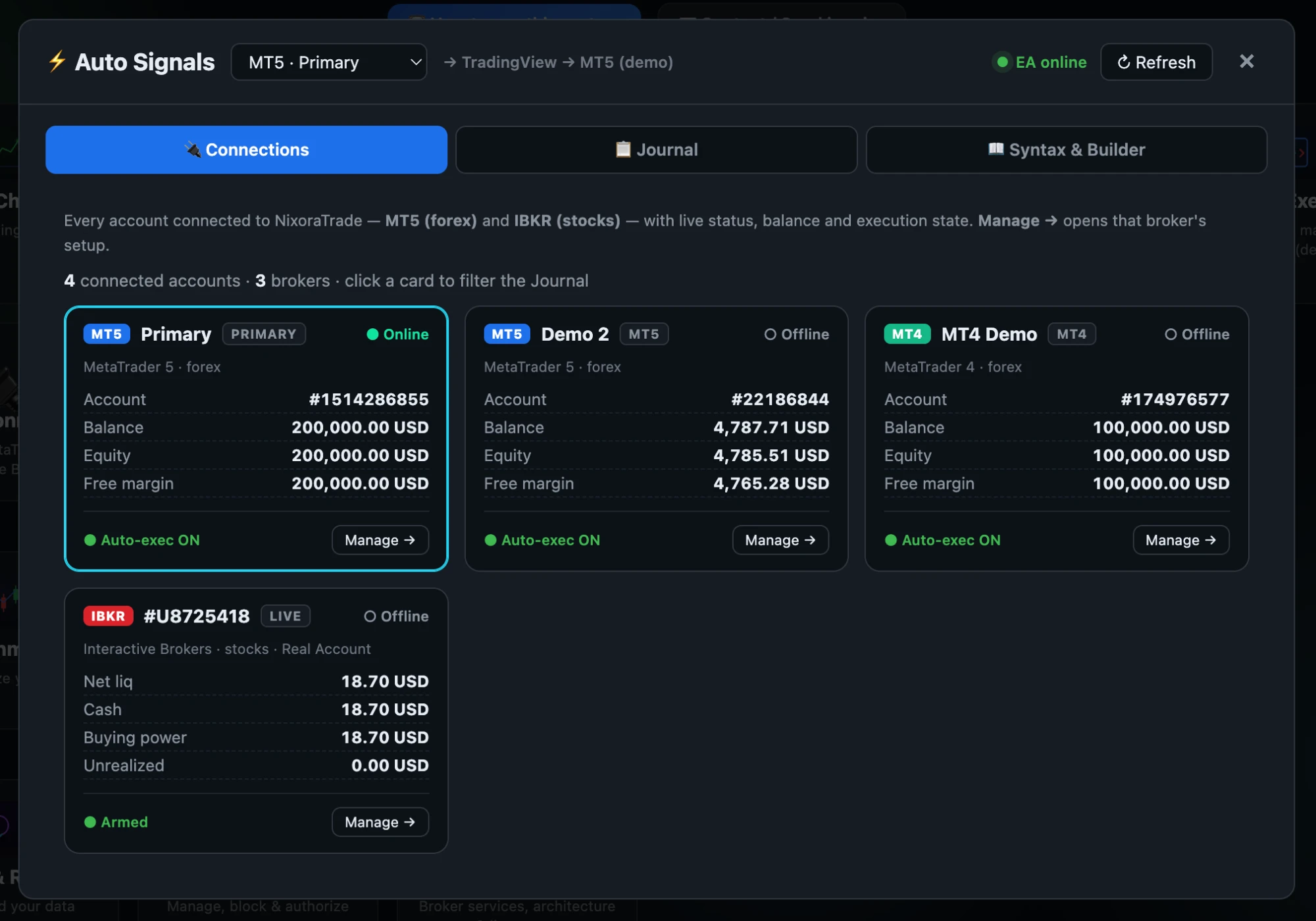
Connections

Every account, one view.

More than one broker and more than one account is the normal case, not the exception. Each connection carries its own status, its own balance and its own execution state.

Every account, one view.
Multiple accounts per brokerA primary MT5 account, a second MT5 account and an MT4 account — each with its own balance and its own execution state.
Live status per connectionOnline or offline, so you know whether a signal can actually reach that terminal right now.
Balance, equity, free marginRead from the account itself, per connection.
Auto-exec per accountArming is per connection. One account can be live while another is disarmed.
Primary designationOne account is the default for new work; the rest are explicit choices.
Filter the journal by cardClick a connection to see only what happened on it.
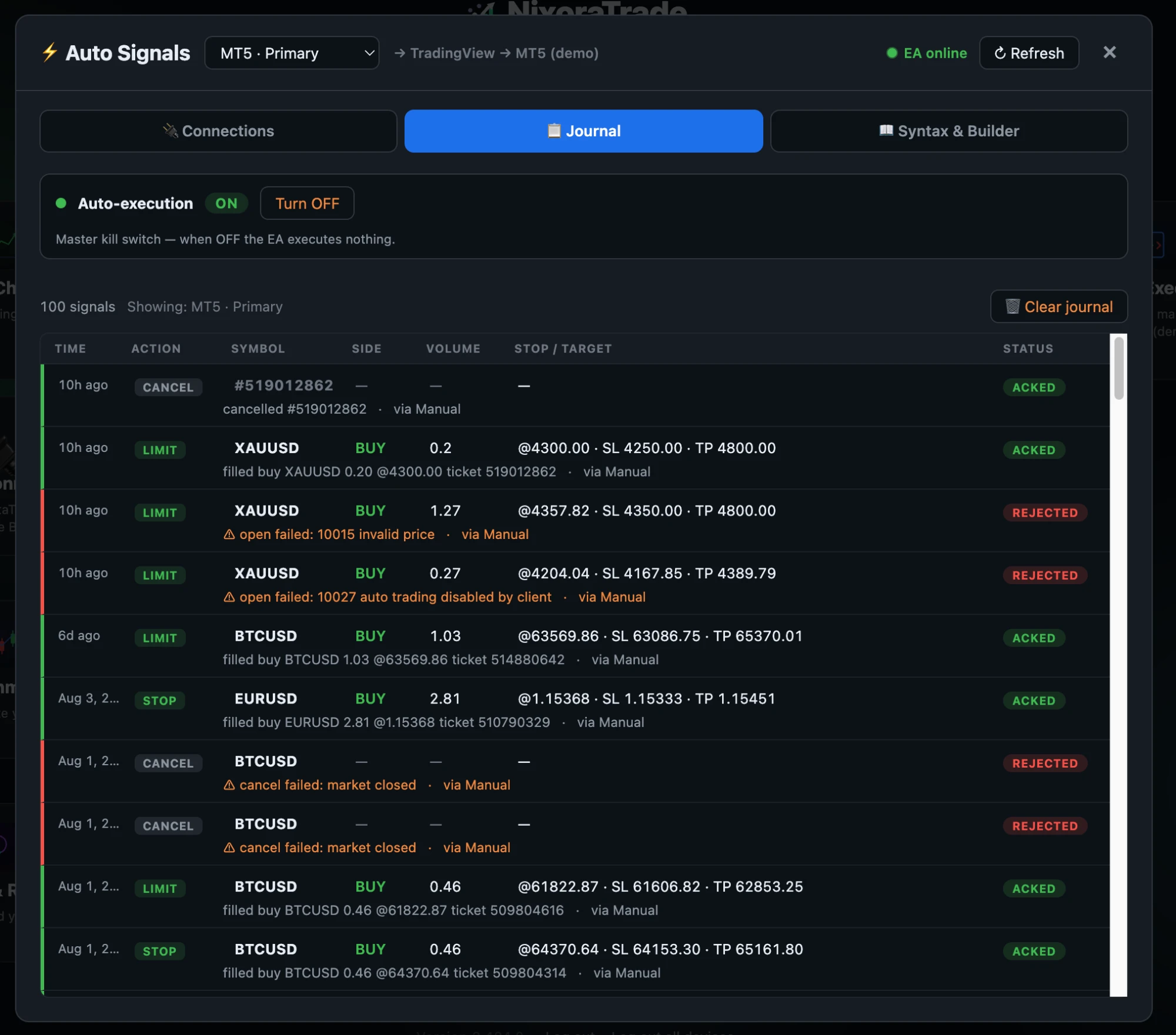
Signal journal

Including the ones that were refused.

Every signal, what it asked for, and what actually happened — with the broker's own words when it said no. A record that only keeps the fills cannot tell you why the others did not happen.

Including the ones that were refused.
Accepted and rejected alikeACKED rows carry the fill price and the broker ticket number. REJECTED rows carry the reason.
The broker’s real error“10015 invalid price”. “10027 auto trading disabled by client”. “cancel failed: market closed”. Not a generic failure.
Full order intentAction, symbol, side, volume, and the stop and target that were requested.
Where it came fromEach row says whether it arrived from a manual ticket or an automated signal.
Filtered by connectionThe journal follows whichever account you selected.
Master kill switchAuto-execution OFF and the EA executes nothing, whatever arrives.
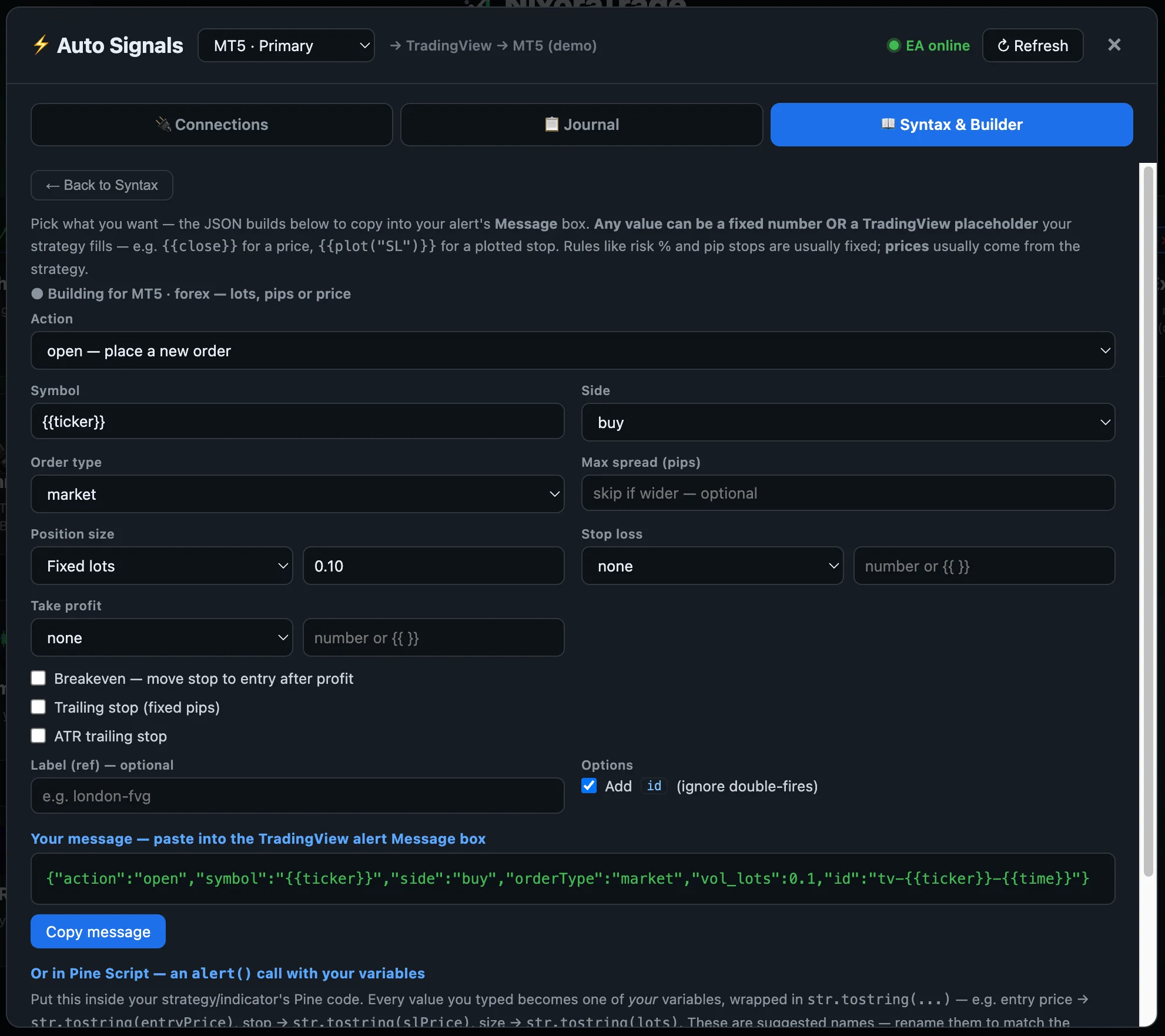
TradingView → MT5

Build the alert, don’t hand-write JSON.

Pick the action, the sizing and the protection, and the message to paste into TradingView's alert box is written for you — with a Pine Script form for values your strategy computes.

Build the alert, don’t hand-write JSON.
Every field is fixed or dynamicType a number, or a TradingView placeholder like {{close}} that your strategy fills at fire time.
Sizing your wayFixed lots, or risk-based sizing from a percentage.
Protection optionsStop loss and take profit, break-even, fixed-pip trailing stop, or an ATR trailing stop.
Max spread guardSkip the signal outright if the spread is wider than you allow.
Duplicate protectionAn id on every alert, so a double-fired alert does not become a second order.
Copy and goThe message and the Pine alert() call are both generated, ready to paste.
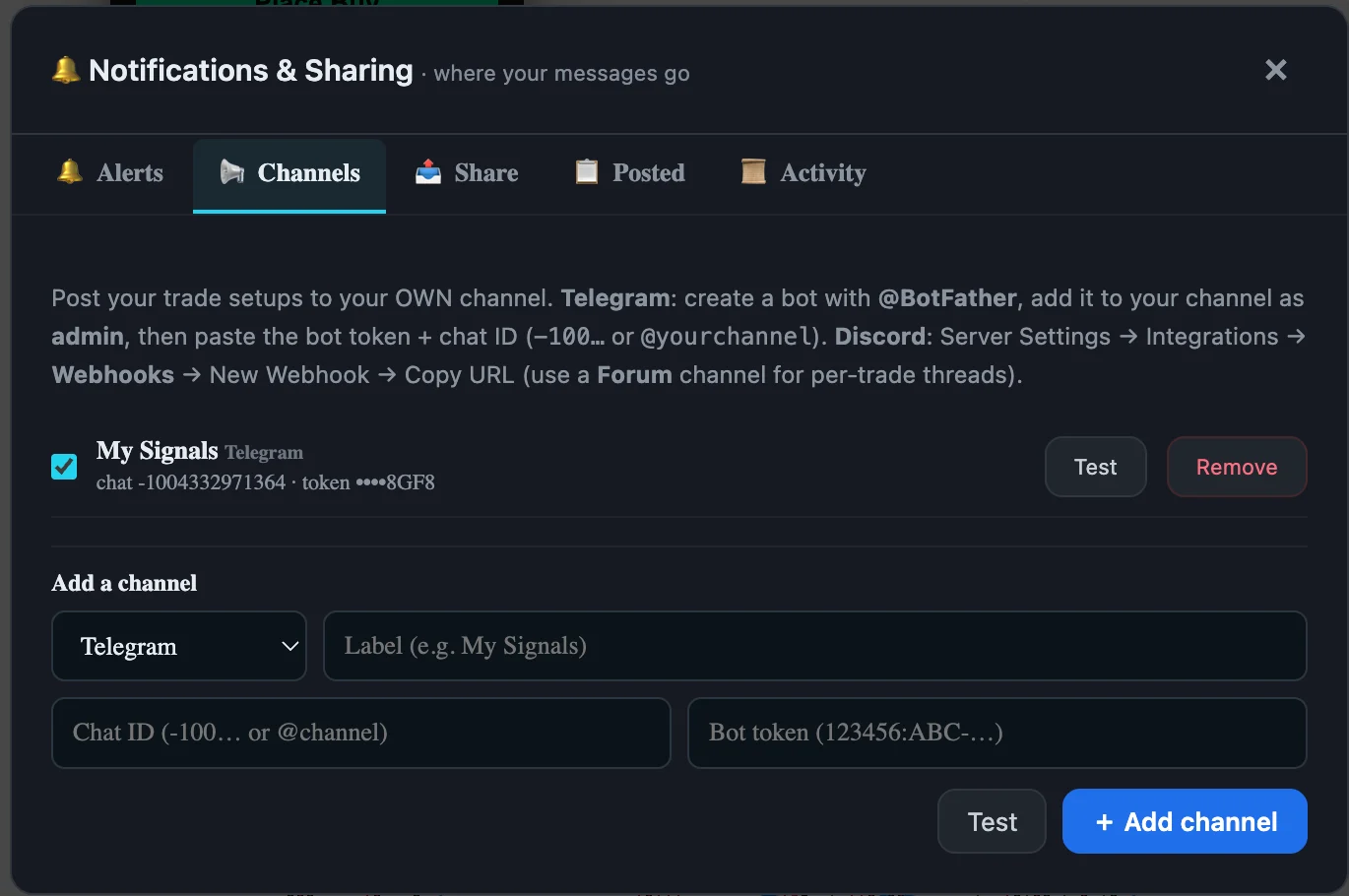
Notifications & sharing

Your trades, in your own channel.

Post setups and fills to a Telegram channel or a Discord server you control — not ours. Connect it once, test it before you trust it, and every trade lands where your people already are.

Your trades, in your own channel.
Your channel, not oursYou supply the bot and the channel, so the audience, the history and the moderation stay yours.
TelegramCreate a bot with @BotFather, add it to your channel as admin, paste the token and chat ID.
DiscordServer Settings → Integrations → Webhooks → Copy URL. Point it at a Forum channel and each trade gets its own thread.
Test before you trust itA Test button on the form and on every saved channel, so a wrong token fails in front of you rather than silently at 3am.
More than one destinationRun several channels at once and switch any of them off with a checkbox — no need to delete and re-enter the credentials.
Credentials stay maskedA saved token shows only its last characters.
Alerts, Share, Posted, ActivityWhat gets sent, what you shared by hand, what has already gone out, and the delivery log.
02 · Know

What the market is doing, and what you wrote down.

What is moving right now, what is due later this week, when the liquidity actually turns up — and the strategies, rules and notes you keep for yourself.

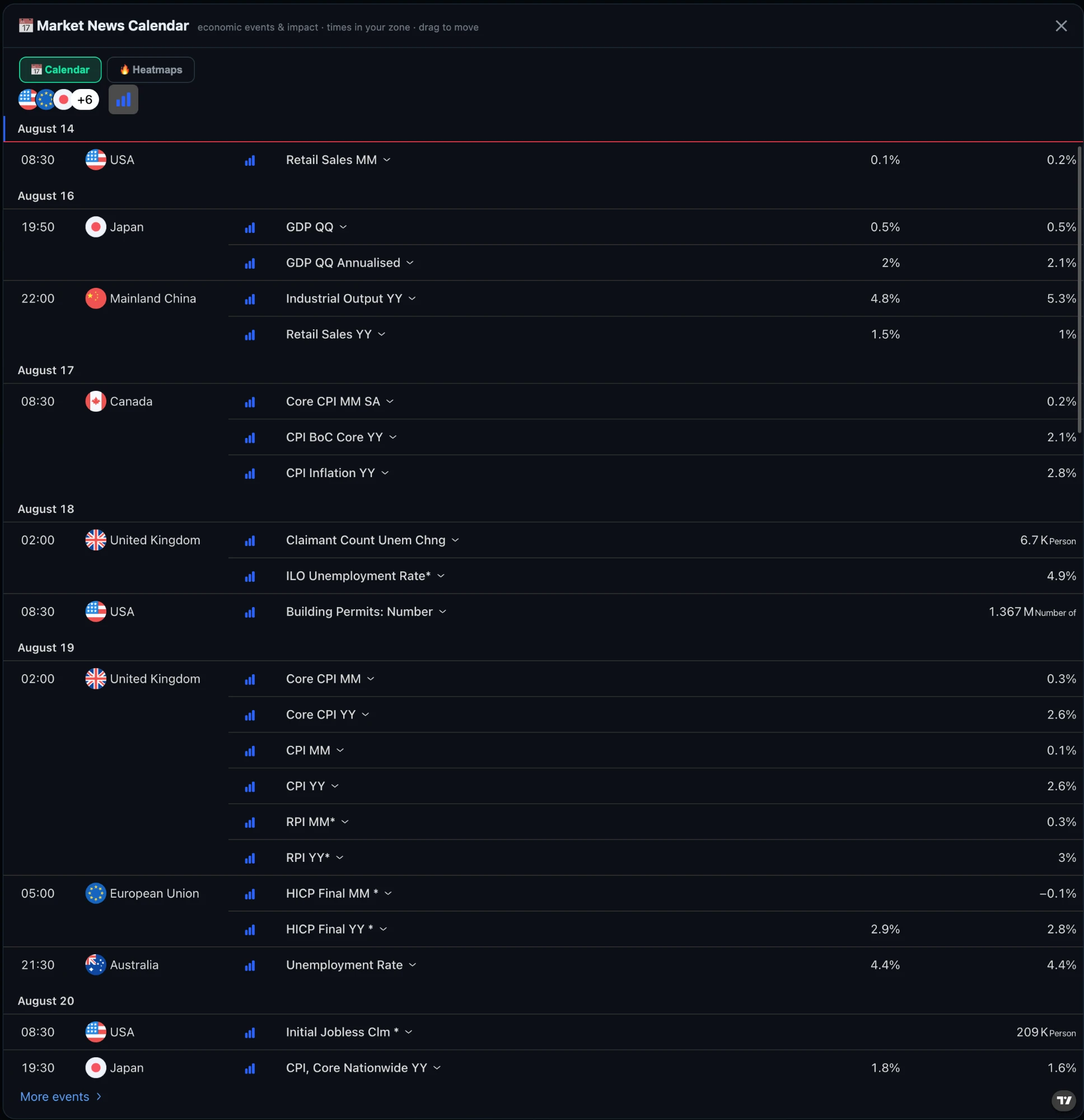
Market news calendar

Know what is coming before it moves.

Every economic release that matters, grouped by day, in your timezone, with the forecast and the previous print side by side. The number that ruins a stop at 08:30 is on this list the day before.

Know what is coming before it moves.
Times in your zoneNo mental arithmetic between GMT, EST and wherever you are.
Forecast against previousBoth figures on the row, so you can see what the market is already priced for.
Impact ratedFilter down to the releases that actually move price and ignore the rest.
Filter by countryUS, EU, Japan, UK, Canada, Australia, China and more — pick the ones your instruments care about.
Grouped by dayThe week reads as a plan, not a list.
Pairs with the sessions viewA high-impact print landing inside the London–New York overlap is a very different trade to the same print at 22:00.
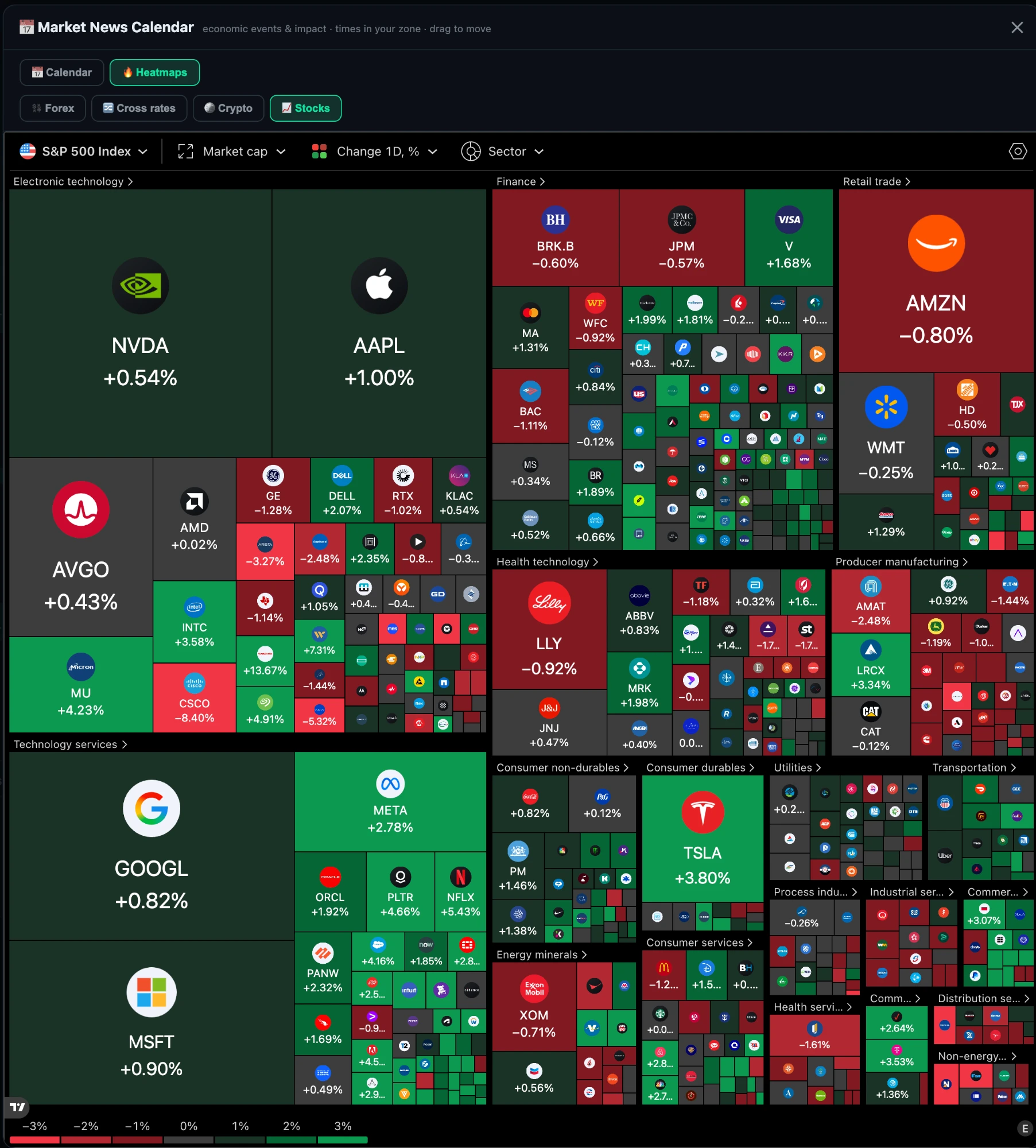
Heatmaps · stocks

Where the market is moving, in one look.

Stocks as a treemap sized by market cap and coloured by the day's move; currencies as a full cross-rate matrix. Strength and weakness stop being something you check symbol by symbol.

Where the market is moving, in one look.
Stocks by sectorThe S&P 500 as a treemap — box size is market cap, colour is the day’s change, grouped into sectors.
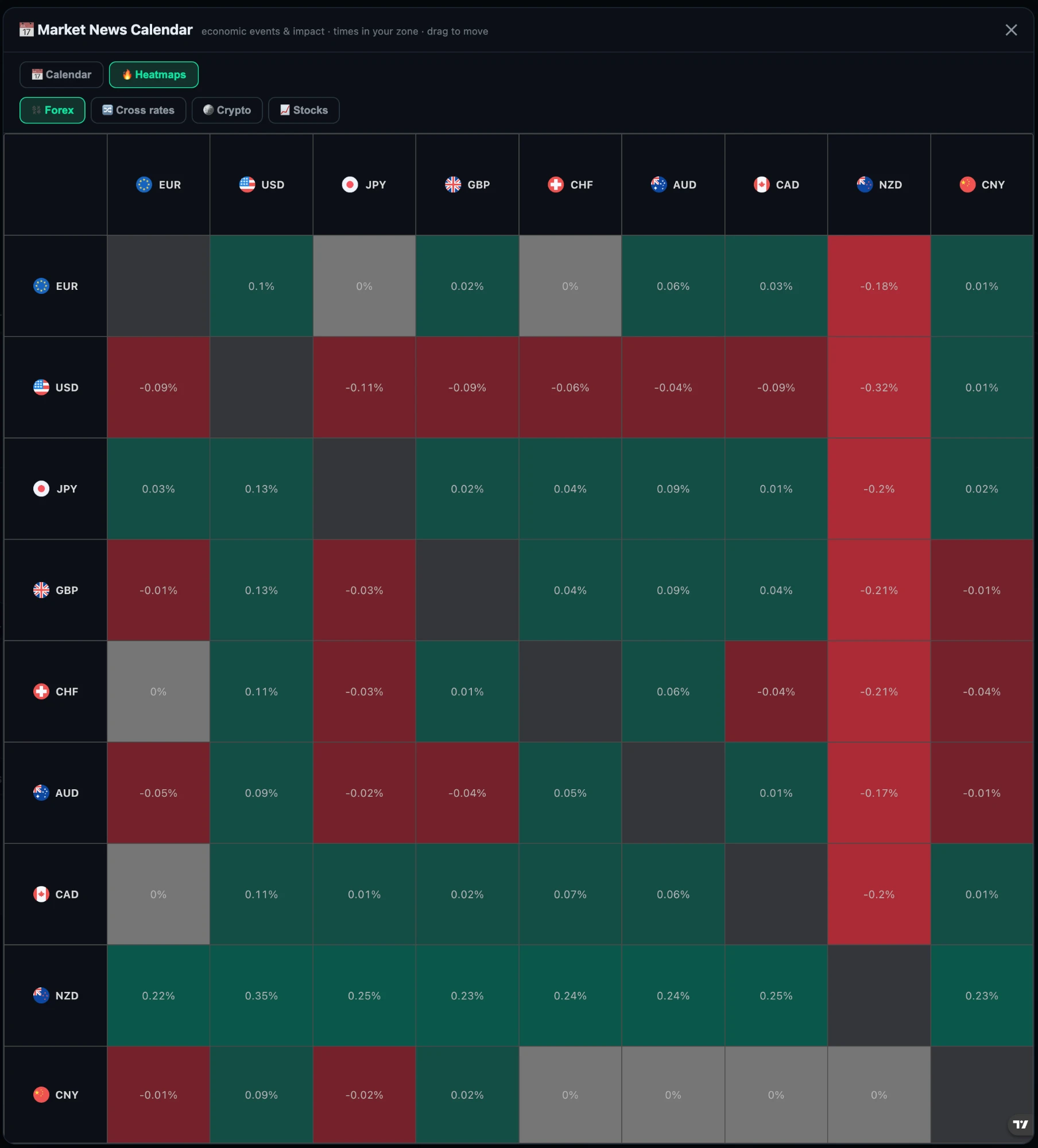
Forex strength matrixEvery major against every other — EUR, USD, JPY, GBP, CHF, AUD, CAD, NZD, CNY — so a currency that is strong against everything is obvious at a glance.
Crypto and cross ratesThe same treatment for crypto and for cross rates.
Size and colour are yoursChange the index, what sizes the boxes and what colours them.
Find the outlierOne deep red box in a green sector is a question worth asking, and it finds you rather than the other way round.
Next to the calendarBoth live in the same panel, so “what happened” and “what is due” are one click apart.
Heatmaps · forex

Which currency is actually strong.

A pair only tells you about two currencies. The matrix puts every major against every other, so a currency that is strong against all of them — or weak against all of them — announces itself.

Which currency is actually strong.
Every major, both directionsEUR, USD, JPY, GBP, CHF, AUD, CAD, NZD and CNY, each read across its own row.
A whole row of greenThat is real strength, not one pair moving. In this shot NZD is up against everything and USD is down against everything.
Pick the cleanest pairStrongest against weakest is a better trade than strongest against second-strongest.
Confirms or kills a setupA long on a currency that is red across its entire row deserves a second look before you place it.
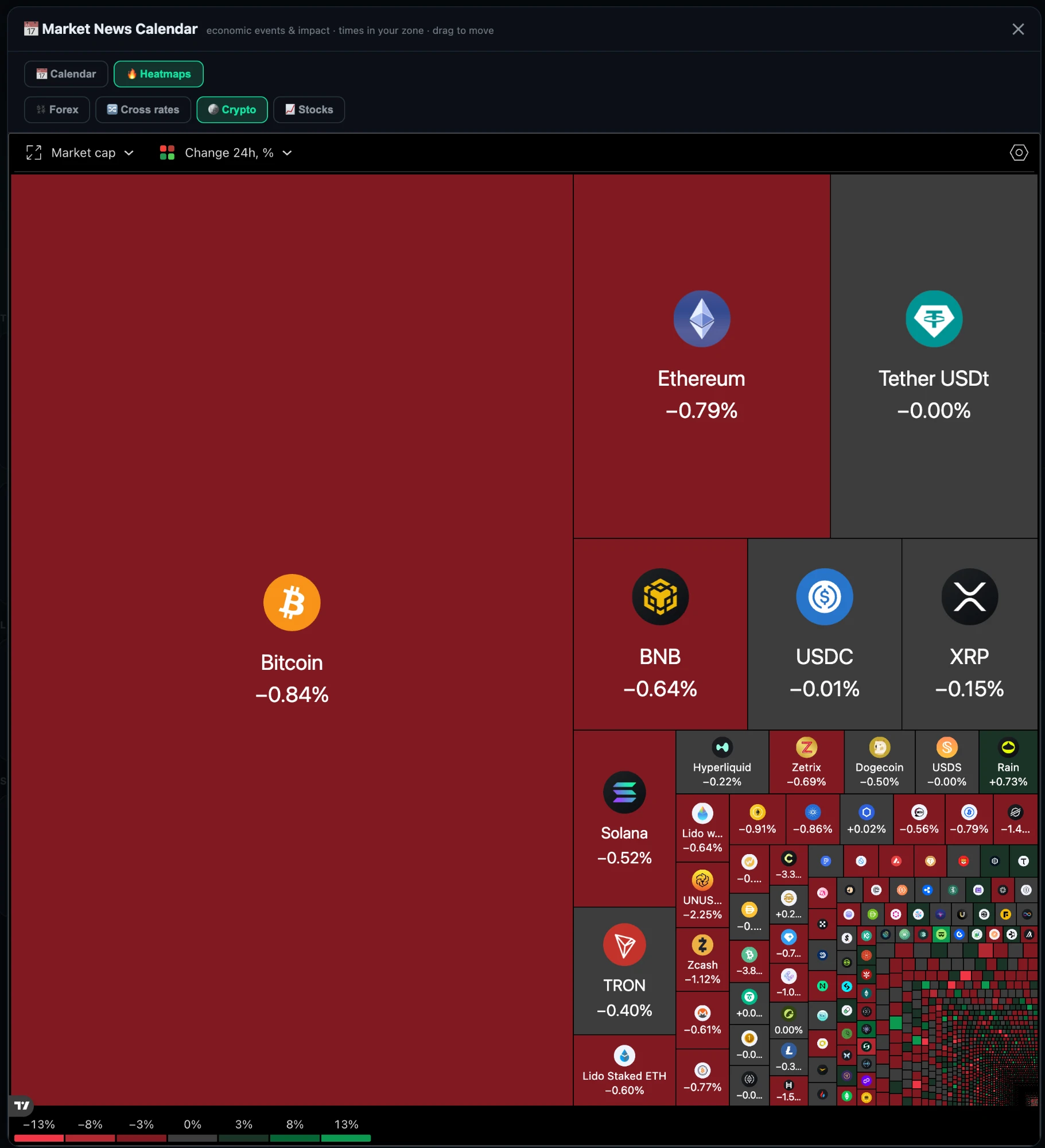
Heatmaps · crypto

The whole crypto market, sized by weight.

Bitcoin, Ethereum and everything below them as one treemap — box size is market cap, colour is the 24-hour move. Whether a selloff is broad or just one coin is immediately obvious.

The whole crypto market, sized by weight.
Sized by market capBitcoin dominates the picture because it dominates the market. Proportion is the point.
Broad move or single nameA sea of red says risk-off; one red box in a green field says something specific happened.
Stablecoins as the controlTether and USDC sitting flat at 0.00% is how you know the colour scale is telling the truth.
Down to the long tailMajors, then the mid-caps, then everything else — in one frame.
Trading sessions

Trade when the money is awake.

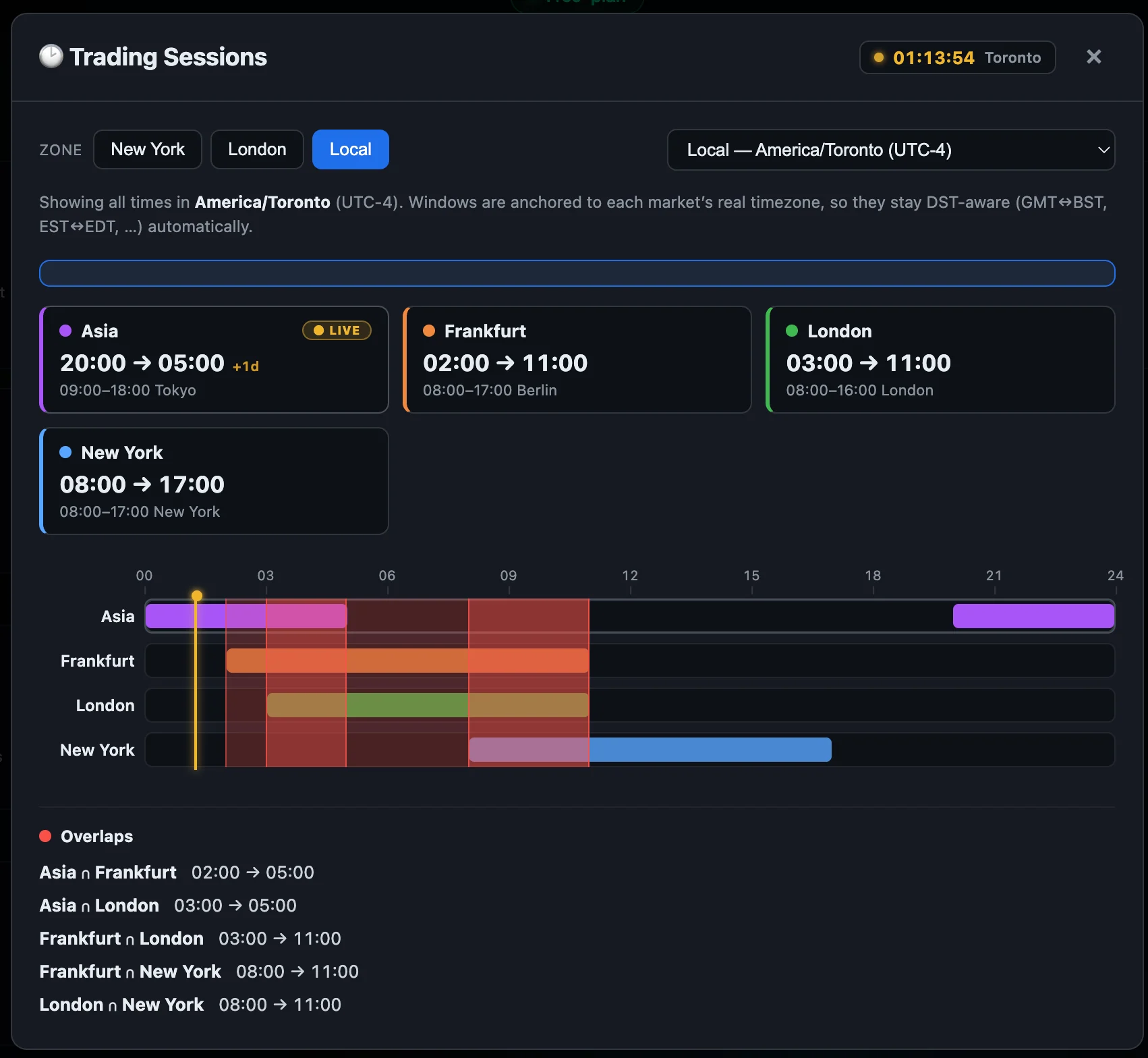
Asia, Frankfurt, London and New York on one 24-hour timeline, in your timezone, with a live marker on the current minute. The overlaps are drawn in red — those are the hours when two markets are open at once and the liquidity is deepest.

Trade when the money is awake.
Every overlap, with its exact windowLondon ∩ New York 08:00 → 11:00, Frankfurt ∩ London 03:00 → 11:00, and the rest — listed, not left for you to work out.
Liquidity at a glanceThe red bands on the timeline are where sessions stack. Wider band, more participants, tighter spreads.
Your timezone, or theirsSwitch between New York, London and your local zone; each card also shows the market’s own local hours.
DST-aware, permanentlyWindows are anchored to each market’s real timezone, so GMT↔BST and EST↔EDT shifts are handled without you touching anything.
Live now markerA running clock in your city and a LIVE badge on whichever session is currently open.
Know why a fill was poorA wide spread at 22:00 stops being a mystery when you can see that nothing was open.
Notes

Every note remembers where you were standing.

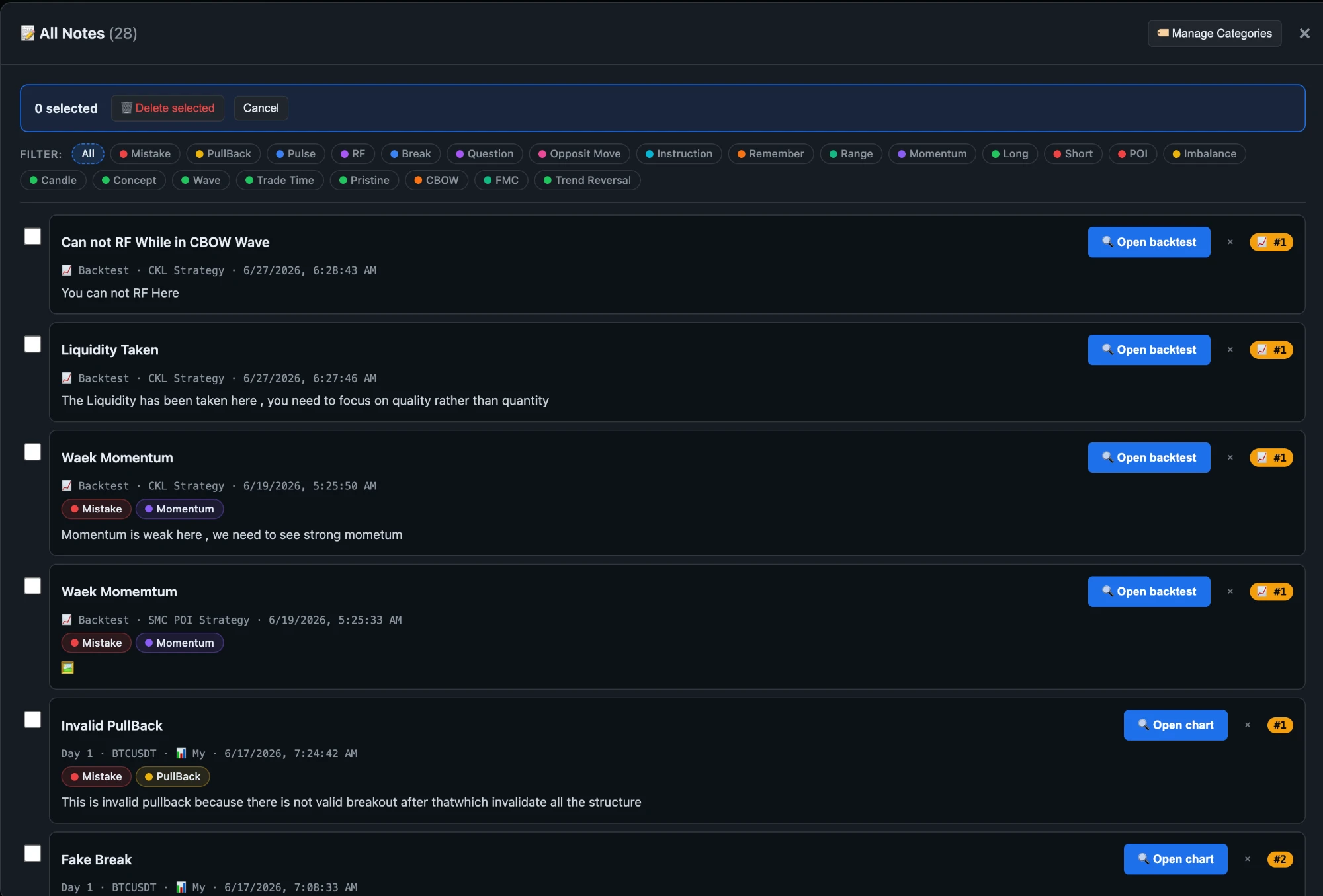
You spot something mid-backtest — the momentum was weak, the liquidity was already taken, that pullback was never valid. Write it down and the note keeps its anchor: the strategy, the session, the instrument, the exact trade. One click and you are back at the candle that prompted it.

Every note remembers where you were standing.
Open backtest · Open chartThe button that makes a note worth keeping. Every note carries a link back to the precise moment it came from, so “what did I mean by this?” has an answer.
Attached to real workA note belongs to a backtest, a trade journal session or a strategy — never floating in a document with no context.
Stamped with its originBacktest · CKL Strategy · 27 Jun, or Day 1 · BTCUSDT. You always know which run produced the thought.
Your own tag vocabularyMistake, pullback, pulse, break, momentum, imbalance, POI, trend reversal, question, remember — you define the categories once and reuse them everywhere.
Filter to one ideaShow every Mistake across every strategy. Or every Momentum note. Patterns you would never spot one session at a time.
Screenshots inside notesAttach the picture of what you saw, not just a description of it.
Bulk manageMulti-select and clear out what no longer applies as your rules mature.
The habit that compoundsTwenty-eight notes is a personal manual nobody else can copy — because it is built out of your own mistakes.
Knowledge base

Write the strategy down. Then trade it.

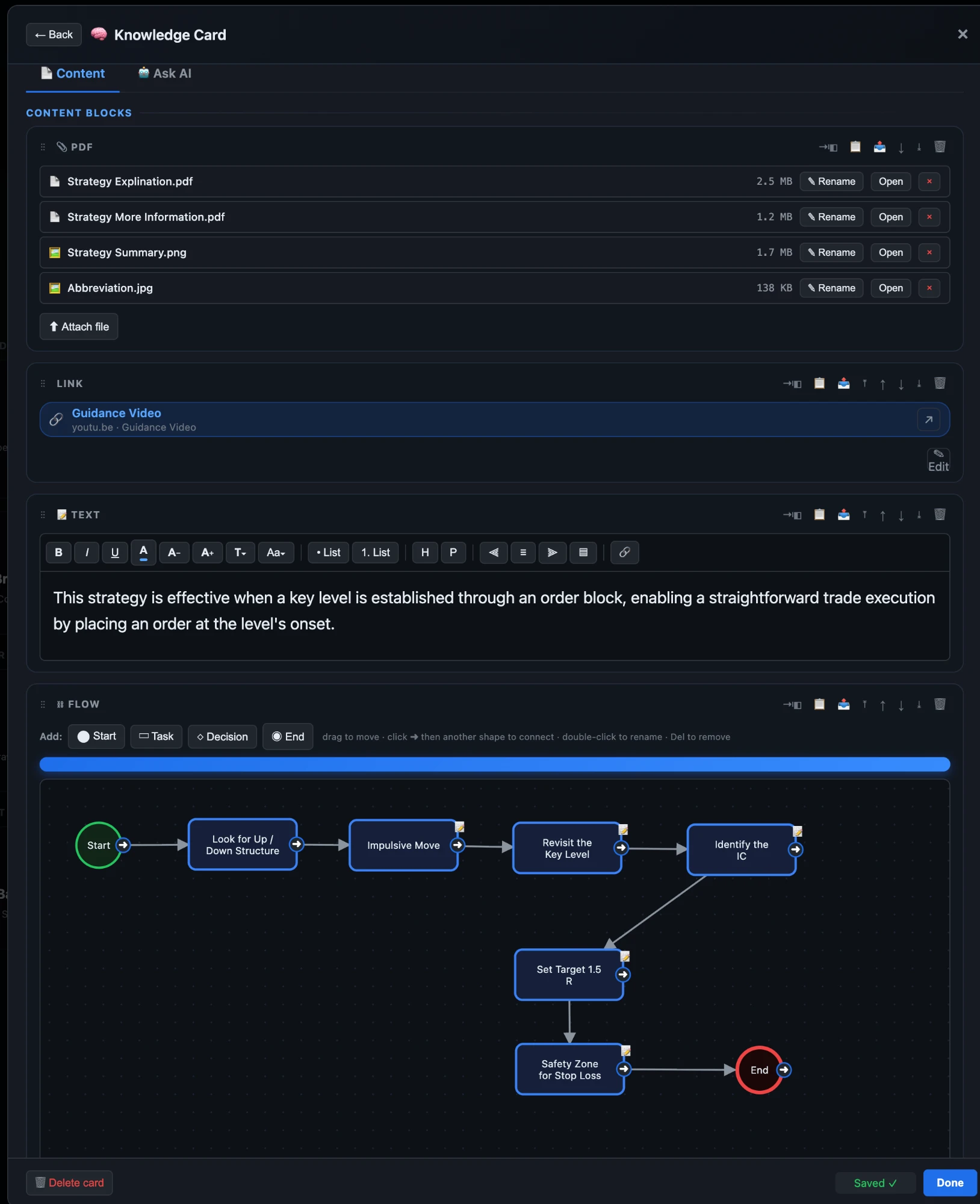
A rule you keep in your head is a rule you break. Your strategies, risk rules and profit rules each get a card — the PDFs, the video, the written rules and a flowchart of the decision — and the same strategy tags the journal, so what you documented and what you traded are the same thing.

Write the strategy down. Then trade it.
A library, not a folderCards grouped into strategies, risk management, trailing profit and notes, with a count on each and search across the lot.
Your own risk rules as cardsRM 1 market running around entry, RM 6 avoid trade at news, RM 7 avoid changing sessions — the same rules that appear as checkboxes when you log a trade.
Tagged the way you thinkPullback, pulse, break, range, candle, wave, trade time, trend reversal — plus long and short on every card.
Import and exportTake your knowledge base with you, or bring a mentor’s in.
Build it from blocksFiles, links, rich text and flowcharts, stacked in any order and reordered by dragging.
Attach the source materialPDFs, screenshots and images with their own names and sizes, opened in place.
Link the videoThe tutorial or explanation that goes with the strategy, labelled rather than pasted as a raw URL.
Write the rules properlyA real editor — headings, lists, colour, sizing, alignment and links — not a plain-text box.
Draw the decisionA flowchart builder with start, task, decision and end shapes: drag to place, click to connect, double-click to rename. The example here runs structure → impulsive move → key level → target 1.5R → stop-loss safety zone.
Ask AI about your own cardA second tab that answers from what you wrote, so the card becomes something you can question.
Same tags as the journalThe strategies on your cards are the strategies you filter trades by — documentation and results share one vocabulary.
Saves as you typeNo save button to forget.
03 · Review

Measure what you actually did.

Backtests, forward tests and live sessions recorded the same way, down to the individual trade — so what you tested and what you traded can be compared without arguing about the method.

Backtesting journal

Test the strategy before it costs you.

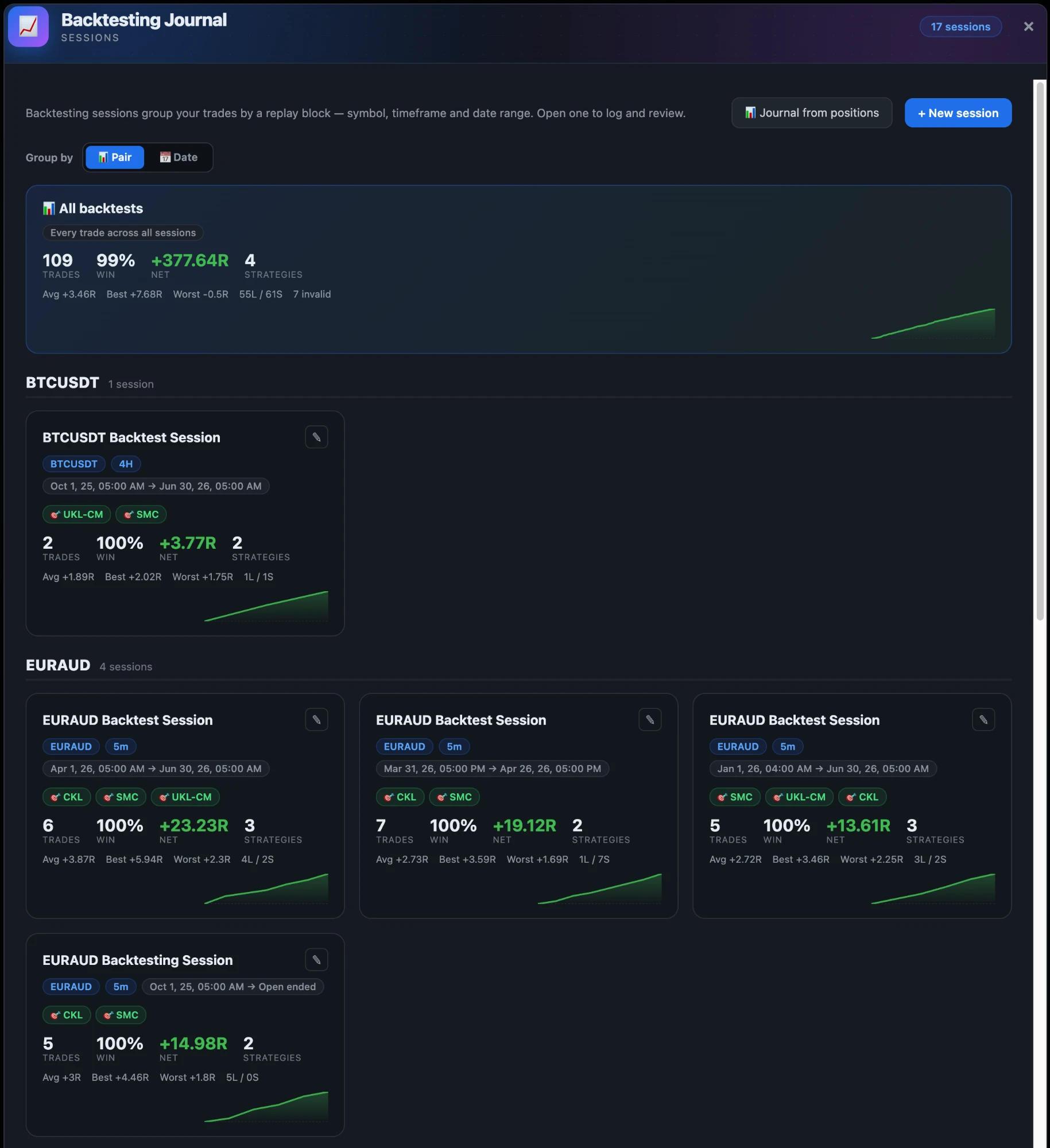
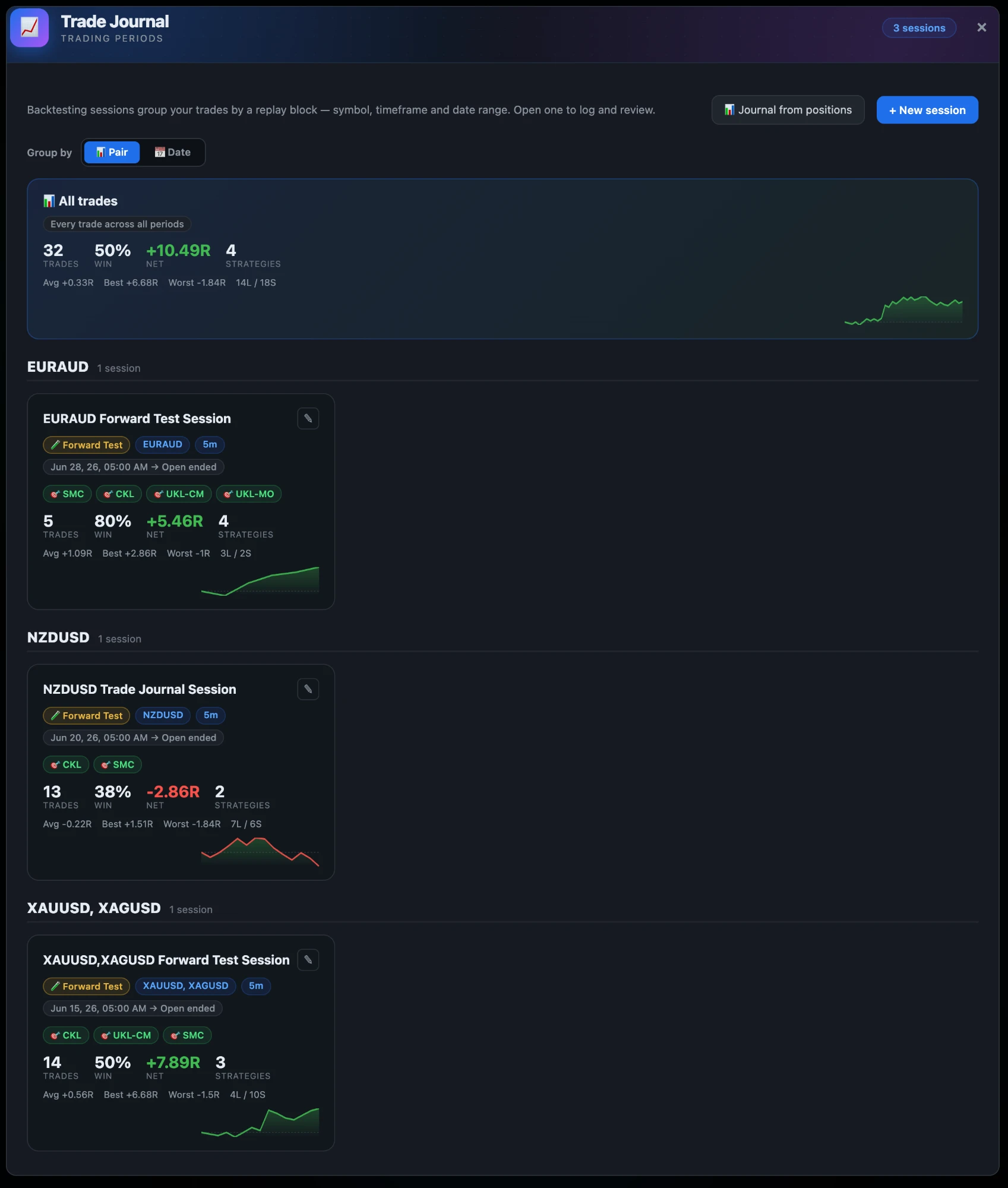
Sessions group trades by a replay block — symbol, timeframe and date range — so a backtest is a thing you can return to and compare, not a number you wrote down once.

Test the strategy before it costs you.
Aggregate across everythingTrades, win rate, net R, strategies, average, best, worst, long/short split — and how many were invalid.
Per-session cardsSymbol, timeframe, date range, the strategies used, the R statistics and an equity curve.
Group by pair or by dateSee one instrument across time, or one period across instruments.
Multiple strategies per sessionTag each trade, then filter the session down to one strategy.
Journal from positionsBuild a session from positions you actually held instead of typing them in.
Measured in RResults are in risk units, so sessions on different account sizes stay comparable.
Trade journal

What you actually did, kept honestly.

The same structure as the backtesting journal, pointed at live and forward-tested trades — so the thing you compare a backtest against is recorded the same way.

What you actually did, kept honestly.
Forward test and liveSessions are labelled, so a forward test is never mistaken for a backtest.
Every trade across every periodOne aggregate at the top, sessions grouped underneath.
Wins and losses both visibleA losing session shows its curve going down. Nothing is hidden or smoothed.
Strategy tagsThe same tags as the backtest journal, so the comparison is like for like.
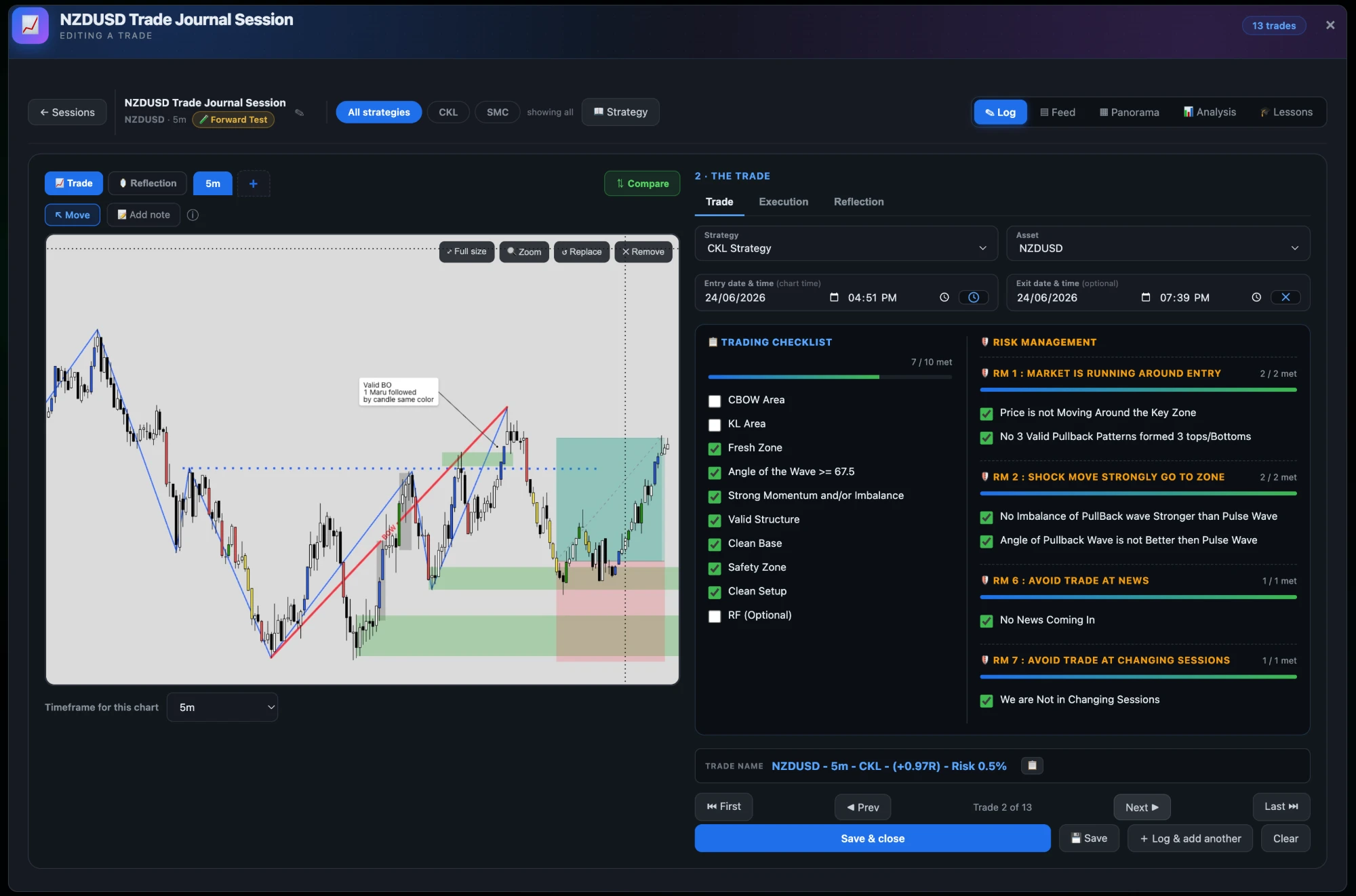
Logging a trade

The chart, the checklist, and what you were thinking.

A trade is logged with its annotated chart, the rules you checked before entering, the execution numbers, and — separately — what you felt and what you would change.

The chart, the checklist, and what you were thinking.
The chart, annotatedYour marked-up screenshot per trade, at more than one timeframe, with notes placed on it.
Trading checklistYour criteria, ticked or not, with the score shown — 7 of 10 met here.
Risk-management rulesNamed rules (running around entry, shock move, news, session change) each marked met or missed.
Execution numbersWin / loss / invalid / missed, direction, R multiple, risk %, entry and exit price, size, P&L and fees.
Reflection kept apartEmotional state, mistakes and lessons live on their own tab, so they do not colour the numbers.
Lesson taggingTag a trade to a lesson as applied or not met, and watch whether it changes.
Auto trade nameSymbol, timeframe, strategy, R and risk composed into one label.
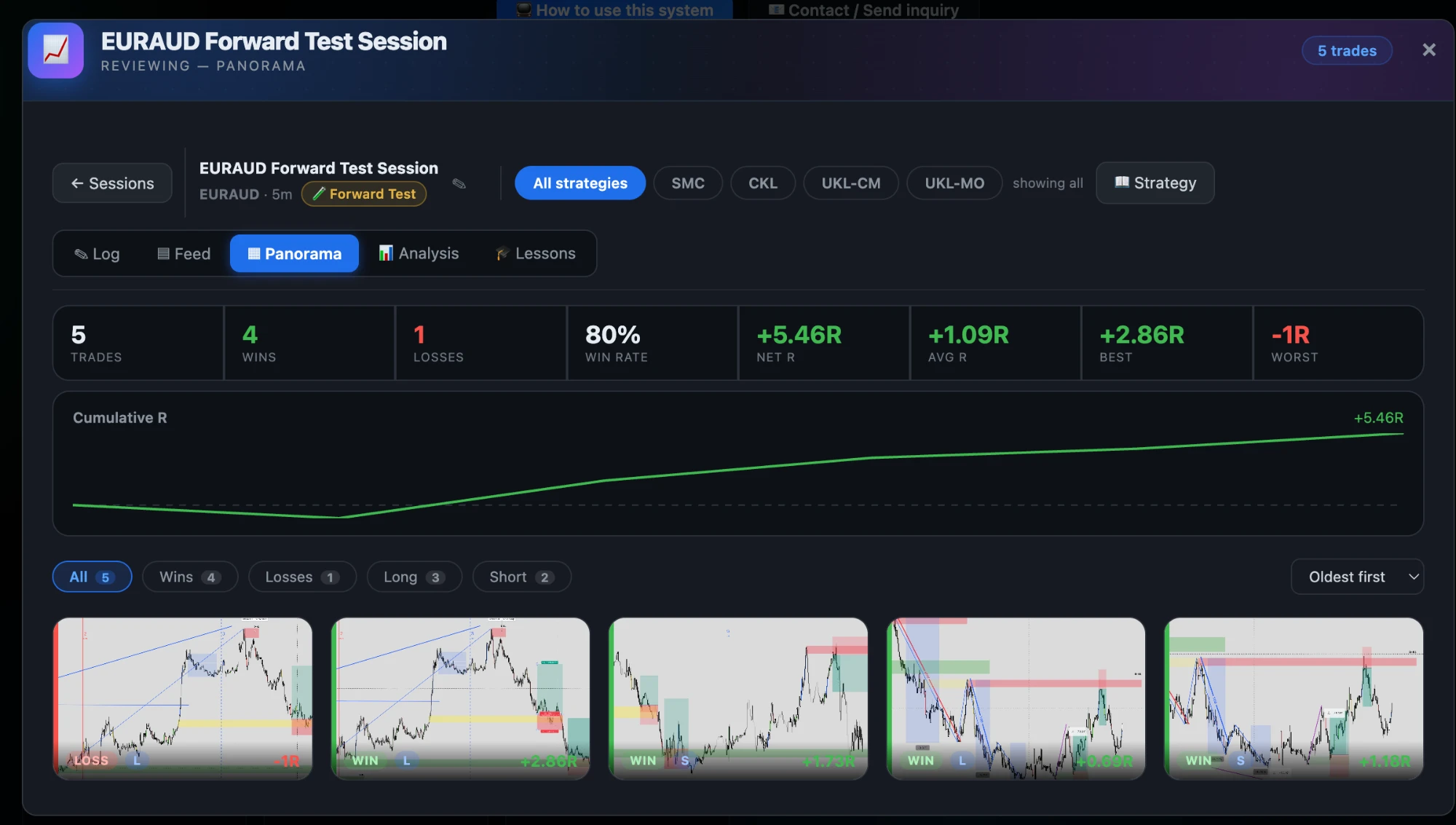
Review

The whole session at a glance.

Trades, win rate, net R and the cumulative curve at the top; every trade's chart underneath, tagged with its outcome. Patterns show up in the wall that never show up in a table.

The whole session at a glance.
Headline statisticsTrades, wins, losses, win rate, net R, average R, best and worst.
Cumulative R curveThe shape of the session, not just its endpoint.
Every chart as a thumbnailEach trade with its outcome and R marked on it.
Filter and sortAll, wins, losses, long or short; oldest or newest first.
Per-strategy viewFilter the whole session to one strategy and see its own numbers.
Honest status

What works today, and what does not yet.

Available now

  • MT5 · MT4 manual execution
  • Chart trading on MT5 · MT4
  • Automated execution on MT5 · MT4
  • Risk-based position sizing
  • Backtesting & trade journal
  • TradingView → your connected broker

In development

  • Alpaca — US stocks (next)
  • Interactive Brokers — stocks
  • Chart trading beyond MT5

Roadmap

  • cTrader
  • Charles Schwab
  • TradeStation

Market data: live charting and quotes come from your own MetaTrader terminal. Depth-of-book and time & sales are not part of the product today.

Your workflow.
Your broker.
Your decisions.

Connect your own MetaTrader 5 or MetaTrader 4 account and start there.